Still Comparing Childcare Software? A Buyer’s Shortlist
It's 9:40 on a Tuesday night. You have three browser tabs open, a spreadsheet of "must-haves" that keeps growing, and a demo booked for tomorrow with a sales rep who will say "all-in-one" at least six times. If that sounds familiar, you're in good company. Choosing childcare management software is one of the most consequential operational decisions a director makes. It touches enrollment, billing, attendance, parent communication, licensing records, and staff files. Pick well and you get hours back every week. Pick poorly and you spend months working around it.
Most feature lists look alike, so the differences that matter tend to hide in the fine print. Here's a shortlist of what to audit before you sign anything.
1. Start with security, because you're holding other people's kids' data
You store birthdates, medical and allergy information, custody notes, and payment details. Don't settle for "we take security seriously." Here are a few important questions to ask:
Is data encrypted both in transit and at rest, using bank-grade protocols?
Who at the vendor can access your records, and how is that access logged?
What happens to your data if you leave?
Any vendor worth shortlisting answers these plainly. Vague answers are normally a red flag.
2. Look past the sticker price to the cost structure
A low monthly number on the pricing page doesn't tell you what you'll pay once you're fully enrolled. Ask how the vendor charges, not just how much:
Per-child or per-seat fees. Costs that rise every time you enroll a family or hire a teacher can quietly erode your margins.
Storage caps and overage charges. Immunization records, incident reports, licensing documents, and staff certifications pile up fast. Find out what happens when you hit the limit.
Setup, terminal, and add-on fees. Some platforms charge for onboarding, payment processing hardware, or features that sound standard. It's important to know this ahead of time especially if you plan to scale.
Contract terms. Check for auto-renewals, price increases, and exit fees.
The best test is to ask for your total cost at 20 children, then at 120. If the answer is hard to pin down, the pricing probably is as well.
3. Find out what your storage limits really are
A childcare center generates paperwork constantly: immunization records, incident reports, licensing documents, staff certifications, signed agreements, and permission forms. A few years in, that's a lot of files. Ask these questions to avoid future price increases or issues.
Is there a storage cap, and what happens when I hit it?
Do I pay more per gigabyte, or get pushed onto a higher plan?
Are there limits on file size or file type?
Can I attach documents to family, child, and staff profiles, or do they sit in a separate folder I have to search?
A hard cap means you're making decisions about which records to delete, and that's a risky position when an inspector or a parent asks for an old document.
4. Make sure your files scale as you grow
Storage that works for one room can become a problem at three. Growth means more children, more staff, more locations, and many more documents to keep organized. Ask:
Will the system stay fast and searchable as my file count grows into the thousands?
Can I organize files by location, family, or staff member?
Can I control who sees which documents, so a staff member sees their own files but not everything?
Can I keep records after a child leaves or a staff member moves on, and for how long?
You want a platform that handles a solo dayhome's handful of files today and a multi-site operation's full archive later, without switching systems in between.
5. Ask how you actually get onto the platform
Switching systems is rarely about the new software. It's about getting your existing records out of the old one: family profiles, enrollment histories, ledgers, staff files, and documents.
Some vendors charge for migration, others hand you a spreadsheet template and wish you luck, while another might quote a timeline with plenty of fine print. Before you commit, ask:
Who does the migration, your team or theirs?
Is it included, or is it an extra charge?
What happens to records that don't import cleanly?
Ensure you know what is all involved in the onboarding process before signing up, to save yourself potential headaches down the road.
6. Test the support before you need it
Every vendor is friendly during the sales process. What matters is what happens at 8 a.m. when a parent can't log in, or when a licensing inspector is on-site and you need a record now. During your trial, send a real question through support and see how long a real answer takes. Live chat that responds quickly beats a ticket queue.
Additionally, find out if the chat is merely an AI tool or if there is an actual human on the other side. Most software companies nowadays utilize only AI, with no option to speak to a human other than sending a ticket request and potentially waiting days. With daycare software, you may have timely questions or issues that need addressing that same day, by an actual human. Any software that offers this already stands above the rest.
Where ChildFriendly Pro fits
We built ChildFriendly Pro around the questions above, because they're the ones directors tell us they wish they'd asked sooner:
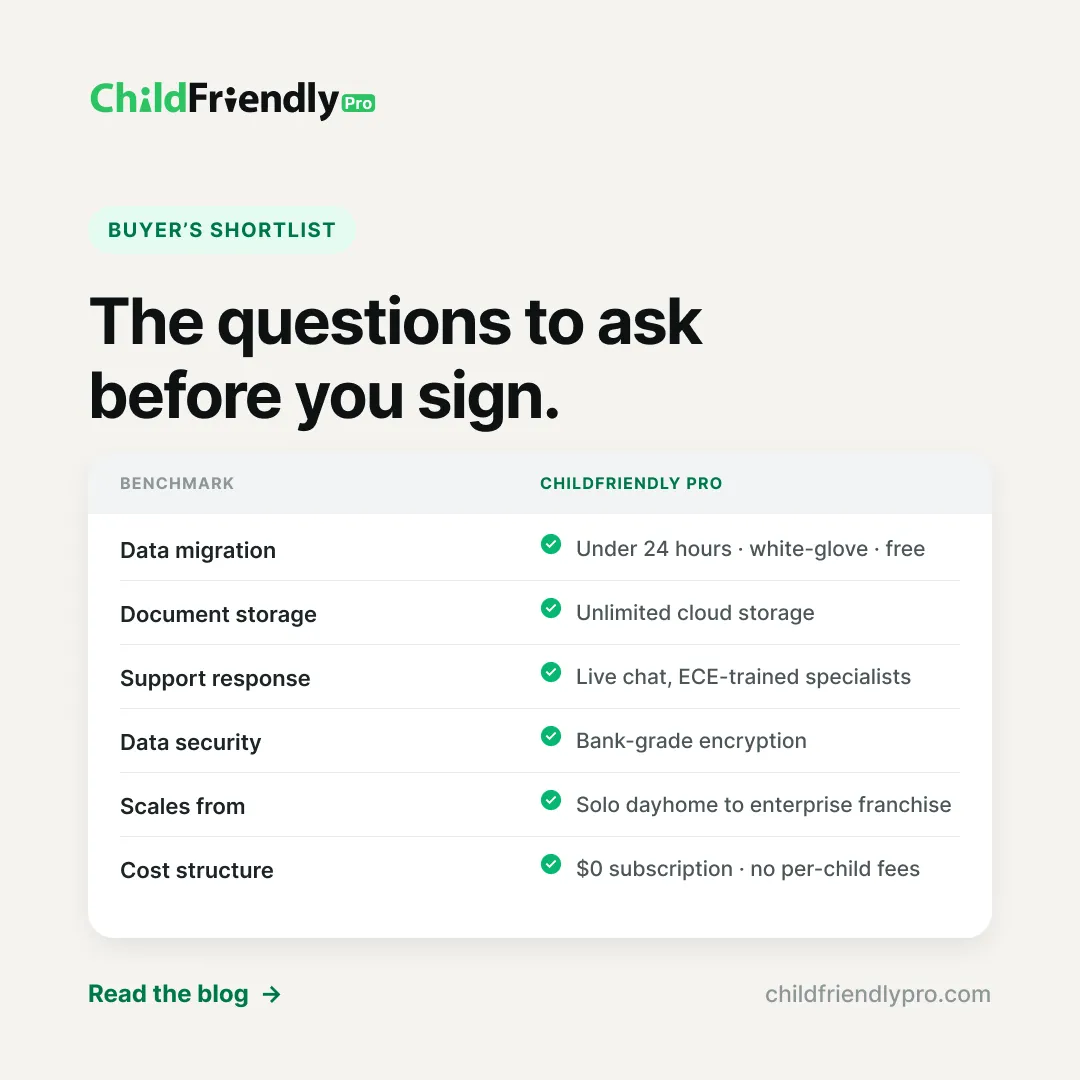
Bank-grade encryption protects the data you're trusted with.
Unlimited cloud document storage means no tiers to track and no surprise overage when you upload another year of records.
Live human chat support gets you a response when you need one.
100% free white-glove data migration means we move you in, so you aren't left doing it alone.
It scales from solo dayhomes to enterprise franchises.
The side-by-side
BenchmarkWhat to look forChildFriendly ProData migrationIncluded in the price, handled by the vendor, with a clear timeline100% free, white-glove migration by our teamMigration speedA stated turnaround you can plan aroundMost centers live within 2 weeksDocument storageNo hard cap, no per-GB upsellUnlimited cloud document storageCost structureTransparent pricing, no per-child or per-seat surprisesTransparent pricing, with zero licensing costs and zero terminal fees on core featuresData securityBank-grade encryption in transit and at restBank-grade encryption protocolsSupport accessReal-time channel, not just a ticket queueLive chat support (with real humans!)ScalabilityOne platform from a single room to multiple locationsSolo dayhomes through enterprise franchises
A quick scorecard for your own demos
Whoever you're evaluating, bring these five questions to every call:
What does migration cost, and who does the work?
Is there any limit on document storage?
What does my bill look like at 20 children, then at 120?
How is my data encrypted, and who can access it?
If I message support right now, how long until a human replies?
If a vendor hesitates on any of them, that tells you something.
The bottom line
Feature lists get you to a shortlist, but cost structure, migration, storage, security, and support are what decide whether the software works for you six months later. If you'd like to see how ChildFriendly Pro measures up, we'll walk you through it.
Boot a demo today to see how the software can help support your childcare operation.