In ChildFriendly Pro's December 2025 webinar, founder Laura Bancroft explained that centers can make curriculum planning visible to families by replacing paper weekly planning sheets with admin-certified digital lessons and weekly plans tied to curriculum outcomes such as Alberta's Flight framework, and she demonstrated the ChildFriendly Pro learning module that she said would be released to users on January 1, 2026.
What the session covered
Bancroft, who said she is still a child care operator and has grown from a 100-child center to over 3,000 licensed spaces in Alberta, described a gap between the planning educators do and what families see. Many centers give educators program planning time to build lessons from their curriculum and complete progress reports, but parents mainly see conversations at drop-off and pick-up, journal entries with photos, and a paper planning sheet on the parent board that, in her words, does not look very professional. She gave three reasons for making planning visible. First, enrollment: families who can see daily activities and the outcomes they relate to are more likely to choose and recommend a center. Second, efficiency: digital planning tools should reduce educator administration time and keep them in the classroom. Third, progress reporting: tracking children against curriculum outcomes and sharing it with parents helps families see educators as educators rather than babysitters. The webinar was largely a product demonstration hosted by Wayne Chen of ChildFriendly Pro.
How does an approval workflow for lesson plans work in a child care center?
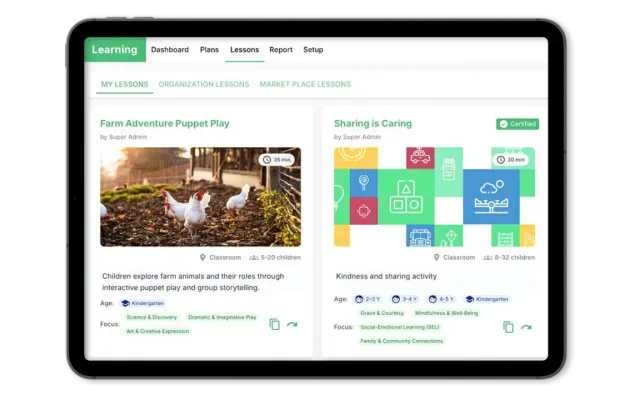
In the room staff view Bancroft demonstrated, a Learn icon opens the learning module. The Lessons area has three tabs. My lessons is each educator's private library, where lessons record a name, description, appropriate ages, core learning focus, discovery topic (a theme such as arctic animals), linked learning outcomes, attachments and materials. Marketplace lessons is a resource library that Bancroft said held over 2,000 lessons, filterable by topic and age, which staff can copy into their own library. Organization lessons shows only lessons that an administrator has certified. When an educator requests approval, the lesson is marked pending until an administrator certifies or rejects it. Bancroft said this lets staff reuse each other's work instead of archiving lessons in a binder where they are lost, and gives directors oversight: reviewing submissions at a glance can reveal patterns, such as an educator whose lessons are not meeting curriculum outcomes and who may need additional training. Administrators manage these approvals from a single dashboard that also lists pending weekly plans and assessments.
How are weekly plans built and shared with parents?
Bancroft said her centers previously filled in an Excel template with areas such as sensory and gross motor for each day, then posted it on the parent board, where linking activities to outcomes was inconvenient. In the demonstrated Plans tab, administrators create reusable templates. An educator clones a template, chooses the week, group and discovery topic (her example was a ladybugs group with a snow and ice theme), adds a cover image, and fills in routines such as morning gathering with activities like a daily story and discussion. Each activity can carry a time, linked learning outcomes, materials and an attached lesson. The educator then submits the plan; an administrator certifies it or rejects it with written feedback, and a plan cannot be shared with families until it is certified. Families then see the plan, its outcomes and attached lessons in a Learning section of the parent app, alongside focus area and progress views. A shopping list report compiles the materials from lessons and weekly plans by group, which Bancroft contrasted with collecting paper supply requests from each room.
How do progress reports and focus area reports track curriculum outcomes?
The demonstrated progress report shows a group's learning outcomes against each enrolled child. Educators add assessments at any point in the year with a date, a growth indicator (the demo used emergent, developing and mastering, which centers can rename) and notes. Assessments become visible to parents only after an administrator certifies them, individually or in bulk at report card time. The focus area report needs no staff input: each time a curriculum outcome is tagged in a journal entry, a feature Bancroft said would start January 1, or appears in a certified plan's lesson on a day the child attended, the count rises. Bancroft said directors can set a date range to spot imbalances, such as too little time on physical health, and parents can see how often an area such as sense of belonging was covered. Setup includes Alberta's Flight curriculum and a Montessori curriculum preloaded, plus custom curricula built from domains, focus areas and outcomes. In the Q&A, Bancroft said planning time is not regulated by government and that some centers give about 2 hours a week.
Curriculum planning workflow shown in the session
| Time | Key point | What centers should do |
|---|---|---|
| 04:36 | Bancroft: parents rarely see educators' planning beyond pick-up conversations, journals and a paper sheet. | Decide which plans and outcomes families should be able to see each week. |
| 05:52 | Bancroft: visible planning supports enrollment, less admin time and progress reporting. | Use these three goals to judge any planning process or tool. |
| 09:05 | Bancroft demo: lessons sit in personal, organization and marketplace libraries. | Keep each educator's drafts separate from the shared, approved library. |
| 11:06 | Bancroft demo: educators request approval and lessons stay pending until certified. | Have a director review lessons before they enter the shared library. |
| 14:45 | Bancroft: her centers used an Excel template pasted to the parent board. | Replace paper planning sheets with templates that link activities to outcomes. |
| 20:00 | Bancroft demo: weekly plans cannot be shared with families until an administrator certifies them. | Set a weekly deadline for plan submission and review. |
| 23:00 | Bancroft: reviewing submissions reveals staff who may need more training on the curriculum. | Use approval patterns to plan coaching and PD. |
| 25:43 | Bancroft demo: assessments use growth indicators such as emergent, developing and mastering. | Agree on one rubric and record assessments with dated notes. |
| 29:13 | Bancroft demo: the focus area report counts outcomes tagged in journals and certified plans. | Check a date range for curriculum areas that are under-covered. |
| 42:50 | Bancroft: planning time is not regulated by government; some centers give about 2 hours a week. | Set a center policy on educator prep time. |
How ChildFriendly Pro automates this
The session contrasted Excel planning templates posted on a parent board and lessons archived in binders with the learning module in ChildFriendly Pro's Classroom & Learning Tools, which Bancroft demonstrated from 08:08: lesson libraries with admin certification, certified weekly plans shared to the parent app, outcome-based progress reports and an automatic focus area report. At 37:33 she also previewed features planned for 2026 at the time of the recording, including custom forms, digital checklists, an AI onboarding wizard and a NECPA accreditation module.
Next steps
- ChildFriendly Pro webinars and event recordings
- Curriculum frameworks, lesson plans and child portfolios
- Free one-page lesson plan template
- Book a ChildFriendly Pro demo