Lead with one positive
Even on hard days, start the pick-up conversation with something the child did well. It earns the right to say the harder thing.
A one-page tick-box checklist that helps educators communicate consistently with families: what to review before the day starts, what to capture during the day, and how to handle the conversation at pickup.
No sign-up required. Print it and share it with your team — it’s free for any child care program to use.
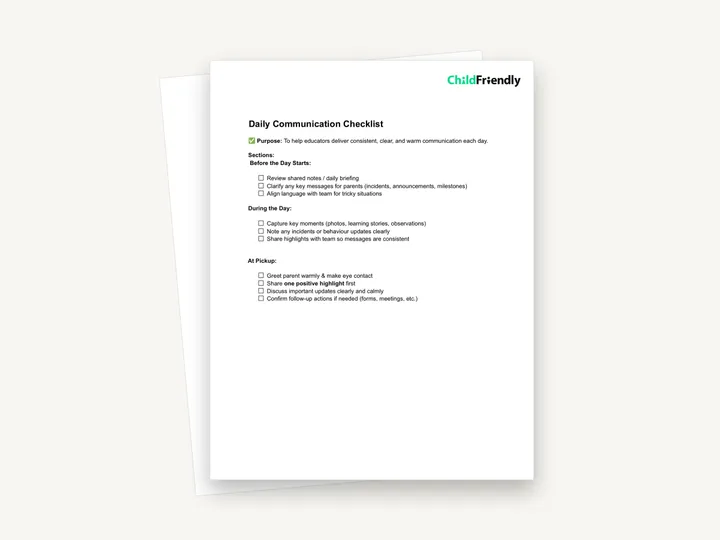
What’s inside
How to use it
Tips from operators
Learned the hard way across 3,000 child care spaces — and from the directors and educators who join our Lunch & Learns and Learning Labs.
Even on hard days, start the pick-up conversation with something the child did well. It earns the right to say the harder thing.
The paper checklist builds the habit; photos, observations and updates logged in a family app reach parents in real time and build the child’s record automatically.
A written incident report is required, but the family should hear it from a person first.
Do it digitally in ChildFriendly Pro
Daily journals, announcements, newsletters and two-way messaging live in the ChildFriendly family app, translated into 198+ languages and delivered with read receipts so you know who saw what.
FAQ
Can’t find your answer? Chat with a real person who has run a child care center.
Read more FAQsRequirements vary. Many regulations require daily records for infants and toddlers (feeding, sleep, diapering) and incident reports for all ages. This checklist is not that record — it is a guide to how educators communicate, so keep your required daily records separately.
This is the educator’s own checklist of communication habits; the journal is what the family sees. In ChildFriendly Pro, the photos, observations and updates you capture during the day go to the family feed.
Incidents, injuries, biting, a child who seemed unwell, or any concern about development. Write it too, but say it first.
Yes — the checklist is not tied to a room or group size. A dayhome provider working alone can skip the team items and use the rest as written.
More templates
Administration
Administration
Family Engagement
Family Engagement
Keep learning
Directors & Admin Workshops · Recording
Strong communication doesn’t happen by accident—it happens through clarity, consistency, and intentional leadership.
Watch the recordingBlog · Tools & Resources
1 min read
Read the articleCompliance guide · Alberta
Ratio & compliance
Read the guideNewsletter
We add new templates and tools most months. Subscribe and they land in your inbox — along with Lunch & Learn and Learning Lab invitations.

Join hundreds of child care professionals across North America. CASL compliant.
You can unsubscribe anytime. CASL/CAN-SPAM compliant.