Add the educators’ photos
Families settle faster when they can recognise the adults. Upload a photo of the room team in Canva and place it on the letter.
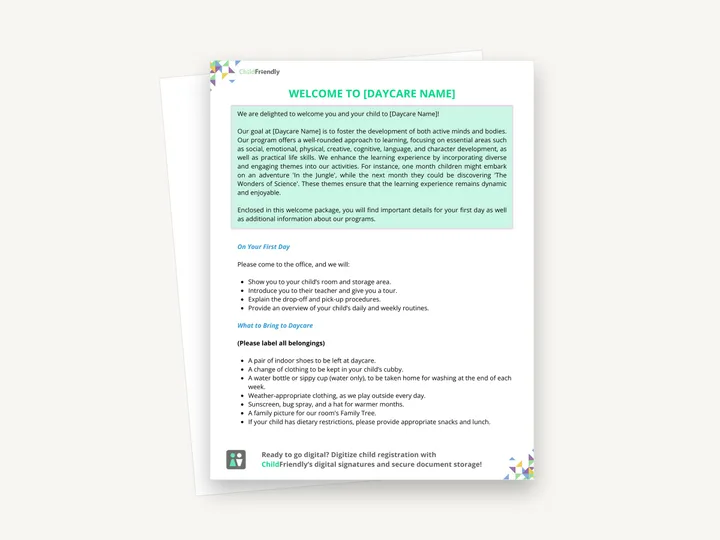
An editable Canva welcome letter for new families, with a welcome message about your program, what happens on the first day and what to bring. The download is a one-page sheet with the link to the Canva design and instructions for editing it.
No sign-up required. Print it and share it with your team — it’s free for any child care program to use.
What’s inside
How to use it
Tips from operators
Learned the hard way across 3,000 child care spaces — and from the directors and educators who join our Lunch & Learns and Learning Labs.
Families settle faster when they can recognise the adults. Upload a photo of the room team in Canva and place it on the letter.
The welcome letter should be short. Point to the handbook for policies rather than repeating them.
One line — ‘Would you like this in another language?’ — is a small effort that means a lot.
Do it digitally in ChildFriendly Pro
Daily journals, announcements, newsletters and two-way messaging live in the ChildFriendly family app, translated into 198+ languages and delivered with read receipts so you know who saw what.
FAQ
Can’t find your answer? Chat with a real person who has run a child care center.
Read more FAQsAbout a week before the start date, once the registration is confirmed and the deposit is paid. Early enough to gather forms, late enough that the details are final.
Both. Email is the one they will search for; the printed copy in the welcome pack is the one they will pin to the fridge.
Policies, fee schedules and procedures — those belong in the parent handbook. Keep the letter to a welcome, the first-day essentials and how to reach you.
If you use a child care platform with enrolment workflows, yes — ChildFriendly Pro sends a branded welcome sequence with app invite links when a family is marked enrolled.
More templates
Family Engagement
Family Engagement
Family Engagement
Administration
Keep learning
Directors & Admin Workshops · Recording
Strong family relationships are the foundation of every thriving child care program.
Watch the recordingBlog · Parents & Families
5 min read
Read the articleCompliance guide · Manitoba
Regional reporting
Read the guideNewsletter
We add new templates and tools most months. Subscribe and they land in your inbox — along with Lunch & Learn and Learning Lab invitations.

Join hundreds of child care professionals across North America. CASL compliant.
You can unsubscribe anytime. CASL/CAN-SPAM compliant.