Skip to content
ChildFriendly Pro
Free templateChild Development & Programming

Shadows & Light: Explore, Create, Build Activity Guide

An 11-page Learning Lab guide from Krystal Churcher of The Churcher Group. Nine open-ended light and shadow activities across Explore, Create and Build, each written for 12–18 months, 19–36 months or 3–4 years, with what to gather, a setup diagram, numbered steps, words to try and a ready-to-adapt message for families.

Format
PDF guide · US Letter
Pages
11
Best for
Educators · room leads
Updated
Oct 2026

No sign-up required. Print it and share it with your team — it’s free for any child care program to use.
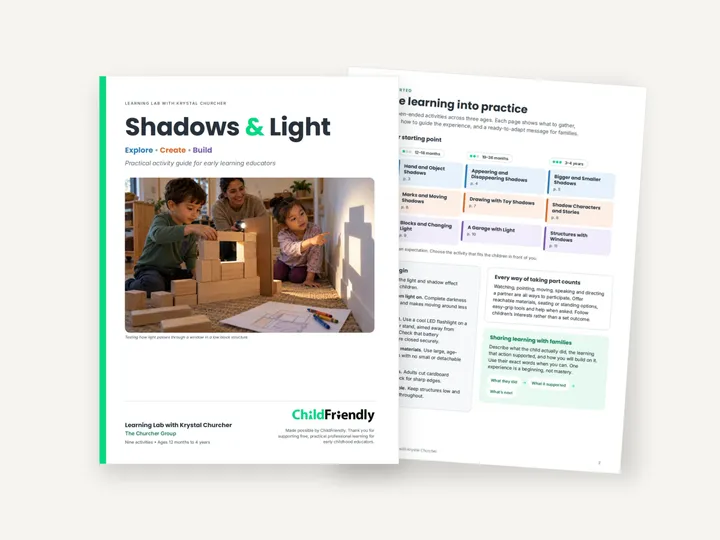
Preview of the Shadows & Light: Explore, Create, Build Activity Guide

What’s inside

A getting-started page, then nine one-page activities

  • Getting startedA grid of all nine activities by age and page number, six “Before you begin” safety checks, notes on ways children can take part, and a three-step structure for sharing learning with families: what they did, what it supported, what’s next.
  • Explore — pages 3–5Hand and Object Shadows (12–18 months), Appearing and Disappearing Shadows (19–36 months) and Bigger and Smaller Shadows (3–4 years), where children predict and test how distance from the light changes a shadow’s size.
  • Create — pages 6–8Marks and Moving Shadows (12–18 months), Drawing with Toy Shadows (19–36 months) and Shadow Characters and Stories (3–4 years), where children make cardstock characters and tell stories with them.
  • Build — pages 9–11Blocks and Changing Light (12–18 months), A Garage with Light (19–36 months) and Structures with Windows (3–4 years), a plan, test and change design cycle with block openings.
  • On every activity pageGather checklist, Set Up with a diagram, Invite and Explore steps, Why It Matters, Words to Try, Notice and Extend (Look For and Next Step) and a Share the Learning with Families example.

How to use it

Four steps to put it to work this week

  1. 1
    Pick an activity from the gridPage 2 lists all nine by age group. The guide says ages are a guide, so choose the one that fits the children in your room.
  2. 2
    Gather and test the light firstCollect the items in the Gather box, set up as shown in the diagram and try the shadow effect yourself before inviting children.
  3. 3
    Follow the children’s leadWork through the Invite and Explore steps, using the Words to Try and watching for the behaviours listed under Look For.
  4. 4
    Share it with familiesPersonalize the family message at the bottom of the page with what the child actually did and, where you can, their exact words.

Tips from operators

What centers that use this well do differently

Learned the hard way across 3,000 child care spaces — and from the directors and educators who join our Lunch & Learns and Learning Labs.

Keep some room light on

The guide says complete darkness is unnecessary and makes moving around less safe. Use a cool LED flashlight, secured and aimed away from children’s eyes.

Large items, low structures

Choose large, age-appropriate materials with no small or detachable parts, and keep any structures low and stable. Adults cut cardboard openings and check the edges.

Repeat before you add

Several Next Step notes suggest offering the same setup again on another day, or adding one new item, rather than bringing out a full basket of materials.

Do it digitally in ChildFriendly Pro

Plan the week in the app — tagged to your framework automatically

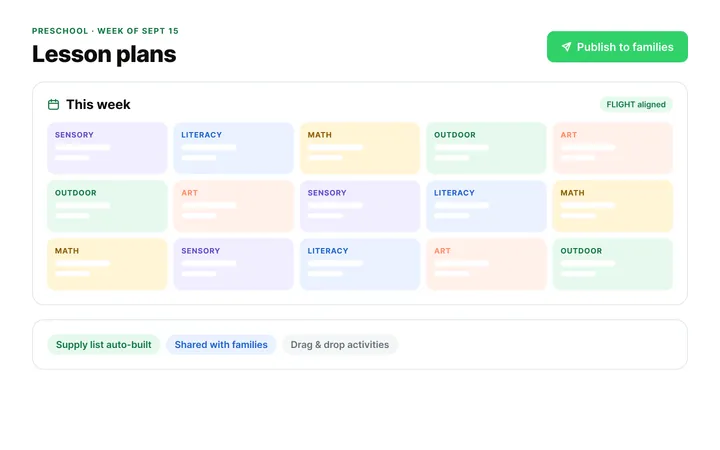
Build the same plan in ChildFriendly Pro and every observation you log is tagged to FLIGHT, ELECT, ELF or your own outcomes, added to each child’s portfolio and shared with families in their daily journal.
  • Pre-loaded provincial frameworks and outcome tags
  • AI learning stories from a photo and two lines of notes
  • Portfolios and progress reports that build themselves
Classroom & Learning Tools in ChildFriendly Pro

FAQ

Questions about the Shadows & Light: Explore, Create, Build Activity Guide

Can’t find your answer? Chat with a real person who has run a child care center.

Read more FAQs
What ages is the guide for?

Twelve months to four years. Each of the nine activities is written for one age group: 12–18 months, 19–36 months or 3–4 years, with three activities per group.

What equipment do I need?

Mostly an LED flashlight, a plain wall or white paper, and things most rooms already have: large blocks or toys, chunky crayons, paper and tape. Some activities add cardstock, cardboard panels or a sturdy box.

Do the family messages need editing?

Yes. Each one is an example with [name] in place of the child’s name, and the guide asks you to personalize it using what you observed.

Where did this guide come from?

It accompanies the Light, Shadows & Wonder Learning Lab with Krystal Churcher of The Churcher Group, part of ChildFriendly’s free professional learning for early childhood educators.

Keep learning

Related resources from the Academy

Newsletter

Get every new template the week it’s released

We add new templates and tools most months. Subscribe and they land in your inbox — along with Lunch & Learn and Learning Lab invitations.

  • New templates and classroom tools as they’re published
  • Invitations to free Lunch & Learns and Learning Labs
  • Licensing and funding updates for your province
  • No spam — one email a month, unsubscribe anytime
An educator taking a photo of children playing at a pretend shop

Get more from ChildFriendly Pro

Join hundreds of child care professionals across North America. CASL compliant.

You can unsubscribe anytime. CASL/CAN-SPAM compliant.