Skip to content
ChildFriendly Pro
Free templateAdministration

Alberta Child Care Mock Licensing Inspection & Self-Audit Checklist

A ten-page self-audit binder for licensed Alberta child care centers. A facility cover sheet, seven tabs of PASS/FAIL audit items — ratios, ECE staff files, child records, incident and safety logs, CWELCC reconciliation, physical plant and room observation — and a corrective action plan with director sign-off.

Format
Printable PDF · US Letter
Pages
10 (nine audit pages and a closing ChildFriendly Pro product page)
Best for
Center directors · assistant directors · external consultants
Updated
Oct 2026

No sign-up required. Print it and share it with your team — it’s free for any child care program to use.

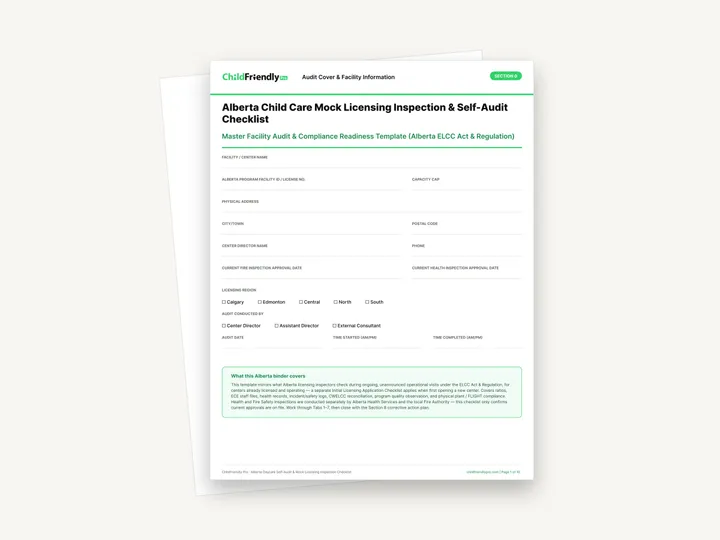
Preview of the Alberta Child Care Mock Licensing Inspection & Self-Audit Checklist

What’s inside

A cover sheet, seven audit tabs and a corrective action plan

  • Section 0: Audit Cover & Facility InformationLines for facility name, Alberta program facility ID / license no., capacity cap, address, director, and the current fire and health inspection approval dates, plus tick boxes for licensing region and who conducted the audit, and the audit date and start and finish times.
  • Tabs 1–2: Ratios and ECE staff filesTab 1 has five PASS/FAIL items on room headcounts, mixed-age rooms, the kindergarten transition cut-off and attendance sheets. Tab 2 is an ‘ECE HR Files & Wage Top-Up Audit Log’ with four staff rows (certification level, record check renewal, CPR / First Aid expiry, direct-care hours) and a five-point ‘Mandatory Staff File Checklist’.
  • Tabs 3–5: Child records, incident logs and fundingTab 3 covers registration files, immunization records, authorized pickup lists and posted allergy sheets. Tab 4 covers critical incident reporting, parent-signed minor incident reports, medication administration sheets and infant sleep check logs. Tab 5 has three items on CWELCC Affordability Grant ledgers, subsidy attendance and Out-of-School Care grant reconciliation.
  • Tabs 6–7: Physical plant and room observationTab 6 has five items — fire drill records, severe weather drill records, washroom water temperature, the kitchen and sanitization log, and optional FLIGHT framework documentation — with blanks for recorded readings. Tab 7 has five observation items: supervision and positioning, interaction quality, room environment, transition and headcount procedures, and transportation safety (if applicable).
  • Section 8: Corrective Action Plan (CAP) & Director Sign-OffTotals for items audited, passed and deficiencies / action required; a three-row table with Item #, Regulatory Deficiencies Identified, Corrective Action Assigned To and Target Resolution Date; and signature and date lines for the auditor and the center director.

How to use it

Four steps to put it to work this week

  1. 1
    Fill in the cover sheetComplete Section 0 before you start, including the fire and health inspection approval dates. The checklist says those inspections are conducted separately and that it only confirms current approvals are on file.
  2. 2
    Work through Tabs 1–7This is the order the document sets out. Each item has a short description of what to check, a PASS or FAIL box and a notes column with a prompt such as ‘Record room-by-room headcount’ or ‘Last drill date’.
  3. 3
    Write down what you found, not only the tickUse the notes column for the evidence: the headcount you recorded, the sink temperature, the file that was missing a signature. A FAIL with no detail is hard to correct later.
  4. 4
    Close with the corrective action planTotal the items, list each deficiency by item number in Section 8, assign it to a named person with a target resolution date, then have the auditor and the director sign and date the page.

Tips from operators

What centers that use this well do differently

Learned the hard way across 3,000 child care spaces — and from the directors and educators who join our Lunch & Learns and Learning Labs.

Check the figures against the current regulation

The checklist quotes specific ratios, group sizes, hour caps, grant amounts and temperature ranges. Requirements and funding rules change, so confirm each figure against the current Alberta regulation and program guides before you rely on it.
Copy the pages you need more of

The staff log in Tab 2 has four rows and the corrective action table has three. Print extra copies of those pages if you have more staff or more deficiencies to record.

Have someone else run it

The cover sheet lets you record whether the director, the assistant director or an external consultant did the audit. A person who does not keep the binder day to day is more likely to notice gaps.

FAQ

Questions about the Alberta Child Care Mock Licensing Inspection & Self-Audit Checklist

Can’t find your answer? Chat with a real person who has run a child care center.

Read more FAQs
Is this an official Alberta government form?

No. It is a self-audit template produced by ChildFriendly Pro. It describes itself as mirroring what licensing inspectors check during ongoing operational visits, and it is meant for your own preparation. It does not replace an inspection or the regulation itself.

Can I use it when opening a new center?

It is written for centers that are already licensed and operating. The cover page states that a separate Initial Licensing Application Checklist applies when first opening a new center; that checklist is not part of this file.

Does it cover health and fire inspections?

Only to the extent of recording the approval dates. The checklist says Health and Fire Safety Inspections are conducted separately by Alberta Health Services and the local Fire Authority, and that it only confirms current approvals are on file.

Can I fill it in on a computer?

It is a print-and-handwrite PDF with no fillable fields. The last page is a ChildFriendly Pro product page rather than part of the audit, so you can leave it out when printing.

Keep learning

Related resources from the Academy

Newsletter

Get every new template the week it’s released

We add new templates and tools most months. Subscribe and they land in your inbox — along with Lunch & Learn and Learning Lab invitations.

  • New templates and classroom tools as they’re published
  • Invitations to free Lunch & Learns and Learning Labs
  • Licensing and funding updates for your province
  • No spam — one email a month, unsubscribe anytime
An educator taking a photo of children playing at a pretend shop

Get more from ChildFriendly Pro

Join hundreds of child care professionals across North America. CASL compliant.

You can unsubscribe anytime. CASL/CAN-SPAM compliant.