Skip to content
ChildFriendly Pro
Free templateStaff Management

PD Day Planning Toolkit (Child Care Programs)

An eight-page toolkit, subtitled the “Setting Educators Up for Success” Toolkit, for planning an annual professional development day and the follow-up after it. Ten sections run from a Quick Start Guide and a five-step planning checklist to a staff needs survey, a topic menu, a sample 6-hour agenda, a follow-up plan and a staff invitation script.

Format
Printable PDF · US Letter
Pages
8
Best for
Owners · directors · program leaders
Updated
Oct 2026

No sign-up required. Print it and share it with your team — it’s free for any child care program to use.
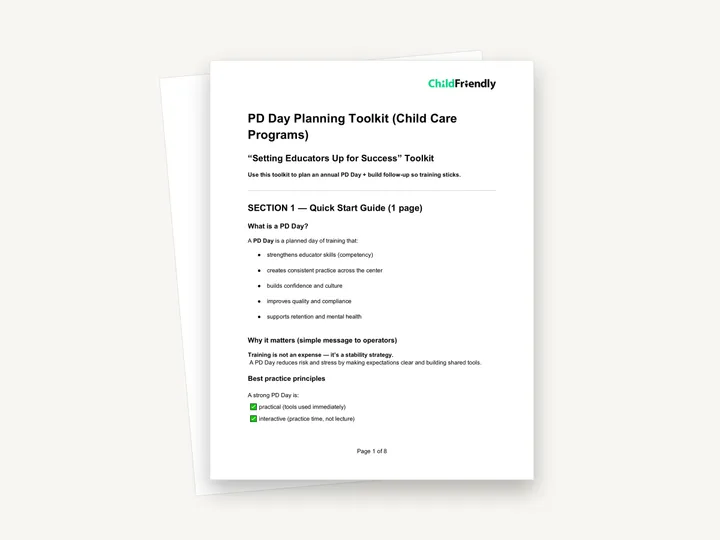
Preview of the PD Day Planning Toolkit (Child Care Programs)

What’s inside

Ten sections, from choosing a theme to measuring results

  • Sections 1 and 2: Quick Start Guide and PD Day Planning ChecklistWhat a PD Day is, why it matters and four best practice principles, then a tick-box checklist in five steps: decide your goal, identify your team needs, choose training that fits, plan the logistics, and follow-up.
  • Sections 3 to 5: Staff Needs Survey, Theme Selector and PD Topic MenuA five-question copy-and-paste survey, a ‘Fit Test’ that checks a theme against Team Fit, Centre Fit and Child Fit, and twelve suggested topics under Behavior + Mental Health, Quality + Compliance, Inclusion, and Team Culture + Leadership.
  • Section 6: Sample PD Day AgendaA ‘6-Hour PD Day Example’ from 9:00 to 3:00 with two training blocks, a workshop for practice and role-play, lunch, a centre action plan and a closing slot for next steps and commitments.
  • Sections 7 to 9: Training That Sticks, Follow-Up Plan and Measuring ResultsA Centre Agreements Template with ‘We will…’ and ‘We will stop…’ lines, seven follow-up supports to choose from with three dated follow-up slots, and tick lists of outcomes to track and ways to track them.
  • Section 10: Staff Invitation ScriptA copy-and-paste message with the subject ‘Our Annual PD Day — Investing in Our Team’ and placeholders for the PD Day theme and the survey deadline.

How to use it

Four steps to put it to work this week

  1. 1
    Set the goal and themeWork through Step 1 of the checklist: pick one or two centre priorities for the year, identify the biggest stress point for staff and write your centre theme on the line.
  2. 2
    Send the Staff Needs SurveyCopy the five questions in Section 3 into an email or form. The Section 10 invitation script asks staff to complete it by a date you set.
  3. 3
    Choose the topic and build the agendaRun your theme through the ‘Fit Test’, pick your top two from the topic menu and adapt the sample 6-hour agenda to your own hours and facilitator.
  4. 4
    Book the follow-up before the dayStep 5 says to schedule two or three follow-ups in advance. Fill in the dates in Section 8 and choose two or three outcomes to track in Section 9.

Tips from operators

What centers that use this well do differently

Learned the hard way across 3,000 child care spaces — and from the directors and educators who join our Lunch & Learns and Learning Labs.

Look at your own records as well

Step 2 of the checklist also asks you to review incident trends, parent concerns, licensing feedback and turnover patterns. Do that alongside the survey so the theme reflects both.

Tell families early

The logistics step includes a coverage or closure plan. If the centre will close for the day, give families the date well ahead.

Prepare PD records in advance

The checklist lists ‘Certificates / PD records prepared’. Have an attendance sheet and certificates ready so each person’s training hours are recorded on the day.

Do it digitally in ChildFriendly Pro

Staff files, hours and reviews that keep themselves current

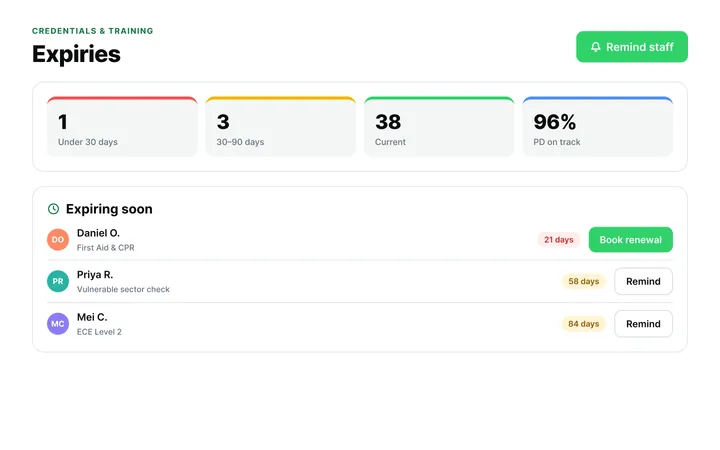
ChildFriendly Pro keeps every educator’s certifications, clearances, PD hours, timecards and review notes in one HR file — with expiry alerts, ratio-aware scheduling and wage top-up hours grouped by level.
  • Kiosk clock-in with break and overtime rules
  • Certification and clearance expiry alerts
  • Direct-care hours by level for wage-enhancement claims
Staff Administration & Scheduling in ChildFriendly Pro

FAQ

Questions about the PD Day Planning Toolkit (Child Care Programs)

Can’t find your answer? Chat with a real person who has run a child care center.

Read more FAQs
Is the training content itself included?

No. The toolkit helps you plan the day, choose a topic and follow up. It suggests twelve topics but does not include slides or training materials for them.

Does the PD Day have to be six hours?

No. The agenda is labelled a ‘6-Hour PD Day Example’. Keep the parts the toolkit calls built-in success factors — staff practice time, shared scripts and routines, centre agreements and a follow-up plan set the same day.

How do I send the survey and invitation?

Both are marked ‘Copy/Paste’, so copy the text from the PDF into an email or an online form. The toolkit does not include a separate survey file.

Can I fill it in on a computer?

The PDF has no fillable fields. Print it on US Letter to tick the boxes and write on the blank lines.

Keep learning

Related resources from the Academy

Newsletter

Get every new template the week it’s released

We add new templates and tools most months. Subscribe and they land in your inbox — along with Lunch & Learn and Learning Lab invitations.

  • New templates and classroom tools as they’re published
  • Invitations to free Lunch & Learns and Learning Labs
  • Licensing and funding updates for your province
  • No spam — one email a month, unsubscribe anytime
An educator taking a photo of children playing at a pretend shop

Get more from ChildFriendly Pro

Join hundreds of child care professionals across North America. CASL compliant.

You can unsubscribe anytime. CASL/CAN-SPAM compliant.