Skip to content
ChildFriendly Pro
Free templateStaff Management

Weekly Staff Check-In Support Guide

A three-page Lunch & Learn guide, subtitled ‘How to Make 10 Minutes Actually Work’, with scripts for short weekly coaching conversations: how to open, surface challenges, coach without taking over, build independence, set one weekly focus and close, plus common mistakes and a worked example.

Format
Printable PDF · A4
Pages
3
Best for
Directors · supervisors · room leads
Updated
Oct 2026

No sign-up required. Print it and share it with your team — it’s free for any child care program to use.
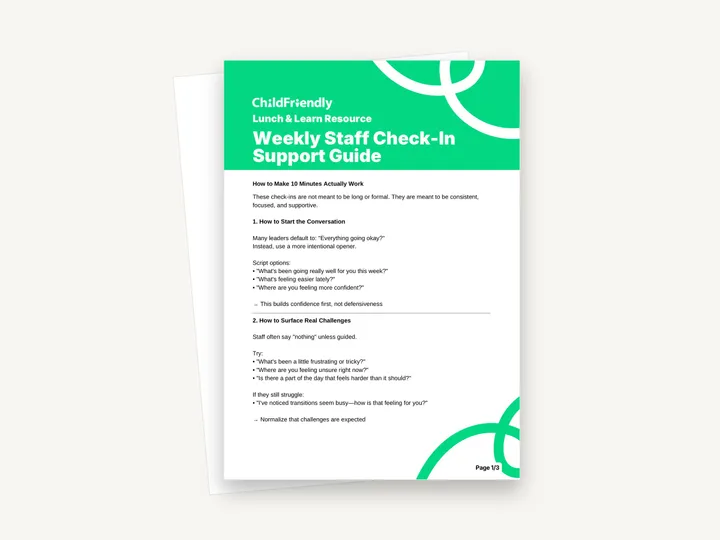
Preview of the Weekly Staff Check-In Support Guide

What’s inside

Eight short sections of scripts for a 10-minute check-in

  • Sections 1–2: Starting and surfacing challenges‘How to Start the Conversation’ replaces “Everything going okay?” with openers such as “What’s been going really well for you this week?” ‘How to Surface Real Challenges’ offers questions like “Is there a part of the day that feels harder than it should?” and a fallback prompt for staff who say “nothing”.
  • Sections 3–4: Coaching and building independence‘How to Coach (Without Taking Over)’ lists three things to avoid and a script formula — “I noticed _______. Next time, try _______.” — with two examples. ‘How to Build Independence (Not Dependence)’ gives three redirecting questions, including “What have you tried so far?”
  • Sections 5–6: Weekly focus and closing‘How to Set a Weekly Focus’ uses the script “Let’s pick one thing to focus on this week” with examples such as “Smoother transitions”. ‘How to Close the Conversation’ gives three closing lines that reinforce progress and set up next week’s check-in.
  • Section 7: Common Mistakes to AvoidFour mistakes: trying to fix everything in one conversation, talking more than the staff member, only giving feedback when something is wrong, and skipping follow-up the next week.
  • Section 8 and Final Reminder‘What This Looks Like in Real Time’ is a short example dialogue about circle time that ends in a weekly focus. The Final Reminder reads: ‘You don’t need more time. You need more intentional conversations.’

How to use it

Four steps to put it to work this week

  1. 1
    Read it once before your next check-inIt is three pages of scripts, not a form. Read the worked example in section 8 first to see how the pieces fit together.
  2. 2
    Choose one opener and one challenge questionPick the lines from sections 1 and 2 that sound most like you. Using the same questions each week makes the check-in predictable for staff.
  3. 3
    Give one adjustment, then set one focusUse the “I noticed… Next time, try…” formula once, then agree a single focus for the week, as sections 3 and 5 describe.
  4. 4
    Close and follow up next weekEnd with one of the closing lines in section 6 and start the next check-in by asking how the focus went. The guide lists skipping follow-up as a common mistake.

Tips from operators

What centers that use this well do differently

Learned the hard way across 3,000 child care spaces — and from the directors and educators who join our Lunch & Learns and Learning Labs.

Pair it with the one-page tool

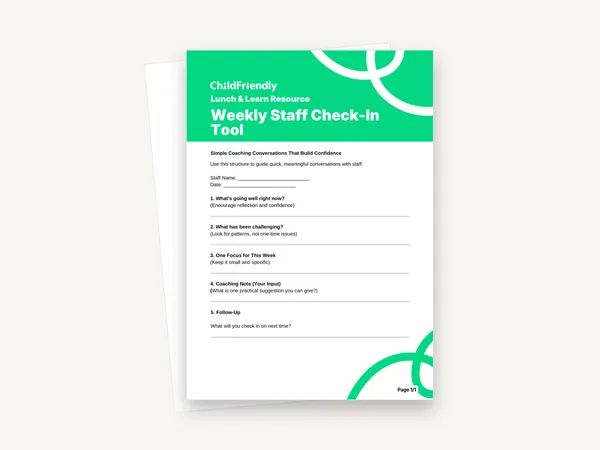
This guide has nowhere to write. Use the Weekly Staff Check-In Tool to record each conversation; its five prompts follow the same order as the guide.

Put the scripts in your own words

The lines are starting points. Staff respond better to a question that sounds like you than to one read off a page.

Listen more than you talk

The guide lists ‘talking more than the staff member’ as a common mistake. Ask the question, then wait; a pause often brings out the real answer.

Do it digitally in ChildFriendly Pro

Staff files, hours and reviews that keep themselves current

ChildFriendly Pro keeps every educator’s certifications, clearances, PD hours, timecards and review notes in one HR file — with expiry alerts, ratio-aware scheduling and wage top-up hours grouped by level.
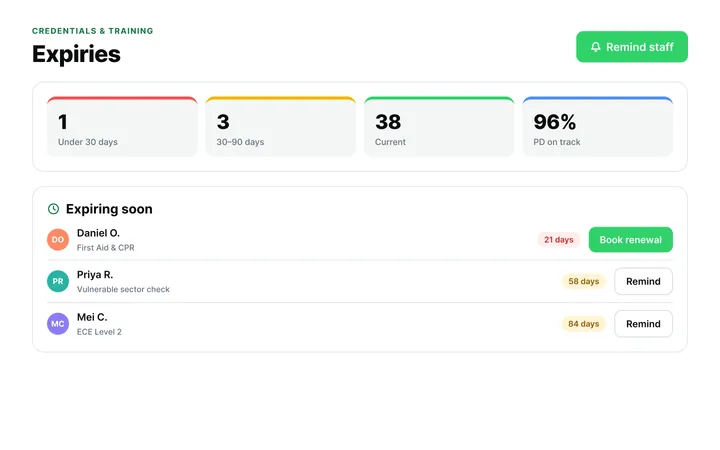
  • Kiosk clock-in with break and overtime rules
  • Certification and clearance expiry alerts
  • Direct-care hours by level for wage-enhancement claims
Staff Administration & Scheduling in ChildFriendly Pro

FAQ

Questions about the Weekly Staff Check-In Support Guide

Can’t find your answer? Chat with a real person who has run a child care center.

Read more FAQs
Is this a form to fill in?

No. It is a reference guide of scripts and examples with no writing lines or tick boxes. The companion Weekly Staff Check-In Tool is the one-page sheet for recording a conversation.

How long should a check-in take?

The guide is subtitled ‘How to Make 10 Minutes Actually Work’ and says check-ins are not meant to be long or formal. They are meant to be consistent, focused and supportive.

Is it a performance review?

No. It describes short, regular coaching conversations with one small adjustment and one focus per week. Keep formal reviews and any disciplinary matters in their own process.

What paper size is it?

The PDF is laid out on A4 and is not fillable. If you print on US Letter, choose ‘fit to page’.

Keep learning

Related resources from the Academy

Newsletter

Get every new template the week it’s released

We add new templates and tools most months. Subscribe and they land in your inbox — along with Lunch & Learn and Learning Lab invitations.

  • New templates and classroom tools as they’re published
  • Invitations to free Lunch & Learns and Learning Labs
  • Licensing and funding updates for your province
  • No spam — one email a month, unsubscribe anytime
An educator taking a photo of children playing at a pretend shop

Get more from ChildFriendly Pro

Join hundreds of child care professionals across North America. CASL compliant.

You can unsubscribe anytime. CASL/CAN-SPAM compliant.