Skip to content
ChildFriendly Pro
Free templateStaff Management

First 30 Days: New Staff Resources

Three Lunch & Learn PDFs for a new hire’s first month: a 30-Day New Employee Roadmap with a weekly checklist for each of four weeks, a Daily Check-In Coaching Card with five questions for a five-minute conversation, and a New Employee Survival Guide to hand to the new staff member.

Format
Printable PDF · A4
Pages
3 + 2 + 2 (three PDFs)
Best for
Directors · supervisors · new staff
Updated
Oct 2026

No sign-up required. Print it and share it with your team — it’s free for any child care program to use.
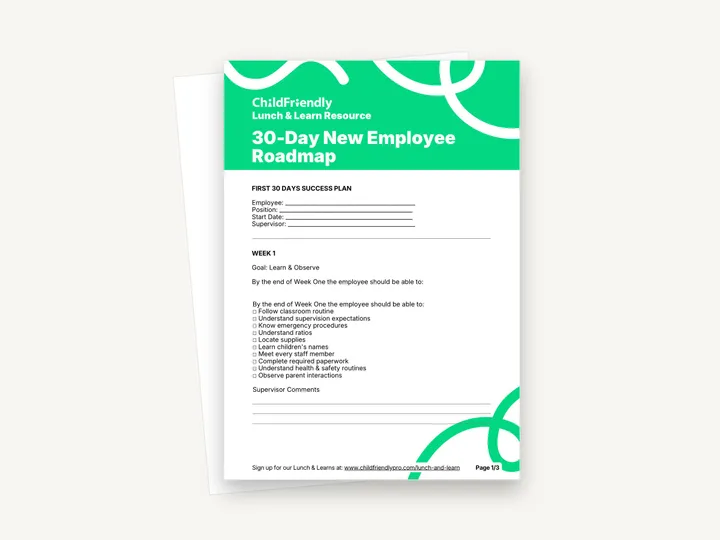
Preview of the First 30 Days: New Staff Resources

What’s inside

A weekly roadmap, a daily check-in card and a guide for the new hire

  • 30-Day New Employee Roadmap: First 30 Days Success PlanLines for Employee, Position, Start Date and Supervisor, then Week 1, ‘Goal: Learn & Observe’, with ten tick-box items such as ‘Understand supervision expectations’, ‘Know emergency procedures’ and ‘Learn children’s names’, and lines for Supervisor Comments.
  • Roadmap Weeks 2 to 4 and Overall ProgressWeek 2 ‘Participate’ (eight items and Supervisor Notes), Week 3 ‘Build Independence’ (seven items, including ‘Lead Circle Time’ and ‘Communicate with families’) and Week 4 ‘Confidence’ (seven items), ending with a rating of Exceeding Expectations, Meeting Expectations or Additional Coaching Required.
  • Daily Check-In Coaching CardA ‘5 Minute Daily Check-In’ of five questions with writing lines — from ‘What went really well today?’ to ‘What’s one thing you’re proud of today?’ — followed by a Supervisor Action section.
  • New Employee Survival GuideA two-page welcome written to the new staff member, with the sections ‘During Your First Week’, ‘Things You Should Always Ask’, ‘If You’re Feeling Overwhelmed…’ and ‘Your First Month Goals’.

How to use it

Four steps to put it to work this week

  1. 1
    Hand over the Survival Guide on day oneIt is addressed to the new employee and lists what to focus on in the first week: relationships, children’s names, safety, routines and asking questions.
  2. 2
    Fill in the top of the RoadmapWrite the employee, position, start date and supervisor, and walk the new hire through the Week 1 list so they know what is expected by the end of the week.
  3. 3
    Use the Coaching Card each dayThe card says ‘Use every day’. Ask the five questions, jot the answers on the lines and write what you will do under Supervisor Action.
  4. 4
    Review the Roadmap at the end of each weekTick what the employee can now do, add comments, and at the end of Week 4 mark Overall Progress and agree what coaching continues.

Tips from operators

What centers that use this well do differently

Learned the hard way across 3,000 child care spaces — and from the directors and educators who join our Lunch & Learns and Learning Labs.

Print a stack of Coaching Cards

Each card records one day. Print enough for the first few weeks, or ask the questions aloud and keep written notes only when there is an action to follow up.

Adapt the checklist to the role

Items such as ‘Lead Circle Time’ suit a classroom educator. Cross out or replace lines that do not apply to a cook, administrator or float.

Keep the finished Roadmap on file

The ticked weeks and supervisor comments are a useful record of onboarding. Store the completed copy with the employee’s other staff records.

Do it digitally in ChildFriendly Pro

Staff files, hours and reviews that keep themselves current

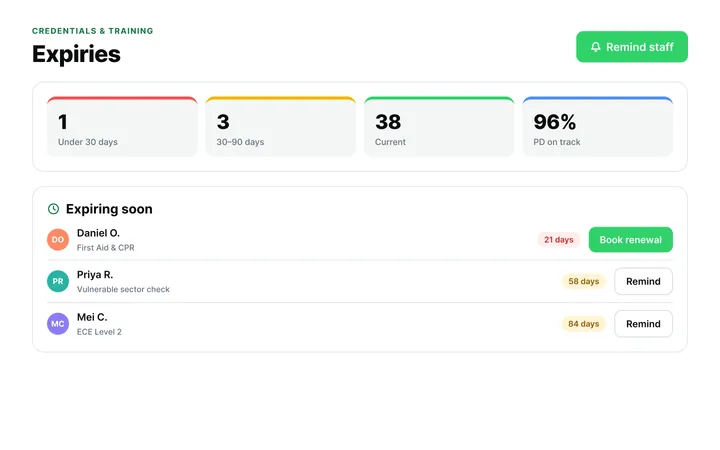
ChildFriendly Pro keeps every educator’s certifications, clearances, PD hours, timecards and review notes in one HR file — with expiry alerts, ratio-aware scheduling and wage top-up hours grouped by level.
  • Kiosk clock-in with break and overtime rules
  • Certification and clearance expiry alerts
  • Direct-care hours by level for wage-enhancement claims
Staff Administration & Scheduling in ChildFriendly Pro

FAQ

Questions about the First 30 Days: New Staff Resources

Can’t find your answer? Chat with a real person who has run a child care center.

Read more FAQs
Who fills in each document?

The supervisor completes the Roadmap and the Coaching Card. The Survival Guide is a handout for the new employee and has nothing to fill in.

Does the Roadmap have space for comments every week?

It has lines for Supervisor Comments after Week 1 and Supervisor Notes after Week 2. Weeks 3 and 4 are tick-box lists only, followed by the Overall Progress rating, and there is no signature line.

How long does the daily check-in take?

The card is titled ‘5 Minute Daily Check-In’ and closes with the line that coaching doesn’t have to take an hour.

Can I fill these in on a computer?

No. All three are print-and-handwrite PDFs with no fillable fields, laid out on A4. If you print on US Letter, choose ‘fit to page’.

Keep learning

Related resources from the Academy

Newsletter

Get every new template the week it’s released

We add new templates and tools most months. Subscribe and they land in your inbox — along with Lunch & Learn and Learning Lab invitations.

  • New templates and classroom tools as they’re published
  • Invitations to free Lunch & Learns and Learning Labs
  • Licensing and funding updates for your province
  • No spam — one email a month, unsubscribe anytime
An educator taking a photo of children playing at a pretend shop

Get more from ChildFriendly Pro

Join hundreds of child care professionals across North America. CASL compliant.

You can unsubscribe anytime. CASL/CAN-SPAM compliant.